HUAWEI IS HERE TO STAY

Huawei’s powerful Multi-screen Collaboration feature comes to new Mate 30 models

 
At the EMUI 10 launch, Huawei announced a unique feature to improve the productivity of users: Multi-Screen collaboration. This was a special feature in EMUI 10 that enabled cross-system and cross-device collaboration. In simple terms, it allowed your Huawei smartphone to connect to your Matebook laptop for quick sharing of resources. Not just that, you could essentially mirror your smartphone to your laptop’s screen.
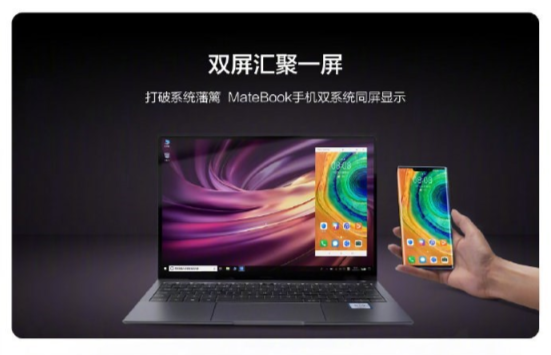
matebook multi screen collaboration emui 10
Today, Huawei has officially confirmed Multi-Screen Collaboration support for 3 EMUI 10 based devices and 5 MateBook laptops.
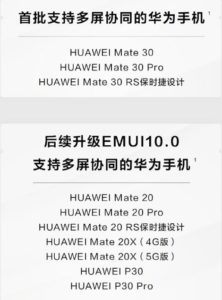
The 3 devices that currently support this feature are all from the new Mate 30 series:
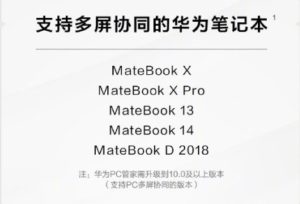
The 5 MateBook laptops that support this feature include:
  • Huawei MateBook X
  • MateBook X Pro
  • MateBook 13
  • MateBook 14
  • MateBook D 2018
Soon, older models will also get support for Multi-Screen Collaboration. The confirmed list of devices include
Multi-screen collaboration is part of EMUI 10’s feature that connects your Huawei smartphone to the MateBook laptop. Once you connect the phone to the notebook via One Touch, QR Code, or Close Range Auto-Discovery, you can mirror its screen on your laptop. Once connected, you can control the apps on the phone via your MateBook laptop. You can even drag and drop files and texts from the mirrored screen directly to the notebook. The information transfer comes with end-to-end encryption, and only authenticated devices can connect to the laptop.
Unfortunately, MateBook laptops aren’t very popular in China. So, despite being a useful feature, only a handful of laptops will benefit from this.

Comments

Popular posts from this blog

Google will start deleting inactive user accounts from next month

Google will start deleting inactive user accounts from next month Back in May, Google officially announced that it would start deleting personal accounts that have been inactive for two years, with the purging process kicking off in December 2023. The reasoning behind this rather radical move is that old accounts are typically the biggest targets for hackers as they may be using insecure passwords, similar to those leveraged by compromised accounts found on the dark web. They are also targets of malicious activities like spam, phishing scams, and account hijacking. Now, Independent reports that Google has started sending out email reminders to users with inactive accounts on the affected accounts themselves as well as recovery addresses, cautioning them that their accounts are being deleted for security reasons. Those impacted will receive an email saying that this move is being implemented “to protect your private information and prevent any unauthorized...

SIM NETWORK UNLOCK PIN

SIM NETWORK UNLOCK PIN FOR HISENSE, MOBICEL, STYLO, HURRICANE, TECNO, VODAFONE, ITEL, SAFARICOM, SKY, ORANGE, OYSTERS, WIKO, TSMART, VERYKOY, MOVITEL, MUSTÈL, NYX, IMO, IPLUS, BLUE, CONDOR, DIGICEL AND MANY OTHER BRANDS EXCLUDING NOKIA, SAMSUNG, LG 1  before you order make sure the imei is from the inside (Dial *#06# for IMEI Number) 2  Please do not submit model which is not in the list Else No Refund 3  Submit Imei 1 only (do not submit imei 2) 4  For submitting wrong IMEI No Refund R105 PRESS HERE TO PAY Then sent IMEI number (press *#06# to reveal it) Description 1- Contact To Site Admin For Submit Your Order +27736109054(Whatsapp/Call) 2- If You Have Bulk Devices We Can Negotiate The Price :) 3-Service Available Timing [MON- FRI 7:30AM-6:30PM|SAT-SUN 10AM-3:00PM] 4-Kindly Make Sure Phone Is Asking For NETWORK UNLOCK CODE... 5-If You Buy The Code For FOREVER LOCKED Device Which Is Not Possible F...

FIX FOR GOOGLE PLAY SERVICE IN HUAWEI

DOWNLOAD GSPACE HERE Gspace is an application for Huawei devices designed to be able to use Google apps. The main advantage of this application is that there is no need to have Google Play services installed since Gspace comes with Google applications preloaded. With Gspace, you can clone Google applications and run them as if the smartphone had Google Play services (GMS). In addition, it allows running multiple requests of applications simultaneously to run dual accounts in a multitude of apps, Google or non-Google, such as Instagram. In case the application is not available in the list, you can add any other one you want. However, if you uninstall the app from your device, the cloned version in the Gspace app will also be deleted. At the permissions level, the tool requests access to calls, location, and storage. This is because it has to write information to the device and because there are apps that it emulates that must also make use of these permissions. In addition, ...

DON'T FIND WHAT YOU WANT RE KWALLE FA

Name

Email *

Message *

Visitors Last 30 days